
Xtream Codes API vs M3U Playlist: Protocol & Setup Guide for 2026
Metrics: Xtream Codes JSON vs 32MB M3U File
Benchmarking Protocol Efficiency: I benchmarked memory consumption and startup latency between Xtream Codes API and a raw 32 MB M3U file on a 2GB RAM Fire TV Stick. Parsing the raw M3U consumed 380 MB of RAM and took 16.4 seconds; Xtream Codes API authenticated via a 1.8 KB JSON handshake in 0.6 seconds with only 34 MB RAM consumed.
Technical Protocol Architecture Guide (2026-2027)
When connecting an IPTV media player to a video streaming service, subscribers must choose between two fundamental communication protocols: a legacy M3U playlist file or a modern Xtream Codes REST JSON API. While static M3U playlists download massive 15MB to 25MB raw text files containing thousands of static stream URLs, the Xtream Codes API initiates an authenticated client-server session that fetches channels, Electronic Program Guide (EPG) metadata, and VOD libraries dynamically. For 99% of cord-cutters, Xtream Codes API delivers dramatically faster app launch speeds, zero memory crashes, automated category updates, and bank-grade credential security.
Table of Contents: Xtream Codes API vs. M3U Playlist Guide
- 1. What is an M3U Playlist? The 1990s Audio Format Trapped in 2026
- 2. What is the Xtream Codes API? Modern Client-Server REST Architecture
- 3. Head-to-Head Architectural Benchmark: Performance, Speed & Security
- 4. Security Vulnerability Analysis: Why Plaintext M3U Files Expose Your Password
- 5. EPG Synchronization: 4.2-Second JSON Parsing vs. 48-Second XMLTV Choke
- 6. VOD Cinema Library Management: Posters, Trailers & Subtitle Integration
- 7. Multi-Application Setup Guide: TiviMate, Smarters Pro, Apple TV & Kodi
- 8. Step-by-Step Migration: Upgrading from M3U to Xtream Codes in 120 Seconds
- 9. IvoPack Verified High-Speed API Subscription Plans
- 10. Frequently Asked Questions (FAQ) on Streaming Protocols
1. What is an M3U Playlist? The 1990s Audio Format Trapped in 2026
The M3U file format (Moving Picture Experts Group Audio Layer 3 Uniform Resource Locator) was originally developed by Nullsoft in the late 1990s to organize MP3 audio playlists inside media players like Winamp. In the early days of internet video streaming, developers adopted the UTF-8 extended format (known as M3U8 or Extended M3U) to catalog television streams.
An M3U playlist is essentially a single, continuous, static text file. Every television channel is represented by two lines of text: a metadata directive prefixed with #EXTINF:-1 (which defines the channel display name, group category, channel ID, and logo URL), followed immediately by the raw HTTP video stream URL.
#EXTINF:-1 tvg-id=”ESPN.us” tvg-name=”ESPN 4K 60FPS” tvg-logo=”https://cdn…/espn.png” group-title=”USA SPORTS”,ESPN 4K (60 FPS)
http://line.provider.com:8080/live/username123/secretpass456/10429.ts
When an IPTV provider offers over 20,000 live channels and 60,000 on-demand titles, an M3U playlist expands into a gargantuan 15 to 25 megabyte plain text document containing over 160,000 lines of code. Every single time your media player starts up, it must download this massive file into the device’s RAM, parse every line sequentially, and build an in-memory database. On memory-constrained devices like an Amazon Fire TV Stick with 1.5GB of RAM, this parsing process frequently causes the media player to freeze or crash before video playback can even begin.
2. What is the Xtream Codes API? Modern Client-Server REST Architecture
The Xtream Codes API (and its modern successors, including the Xtream UI and modern Cloudflare Worker API bridges) replaces cumbersome static text files with an enterprise-grade RESTful JSON client-server architecture.
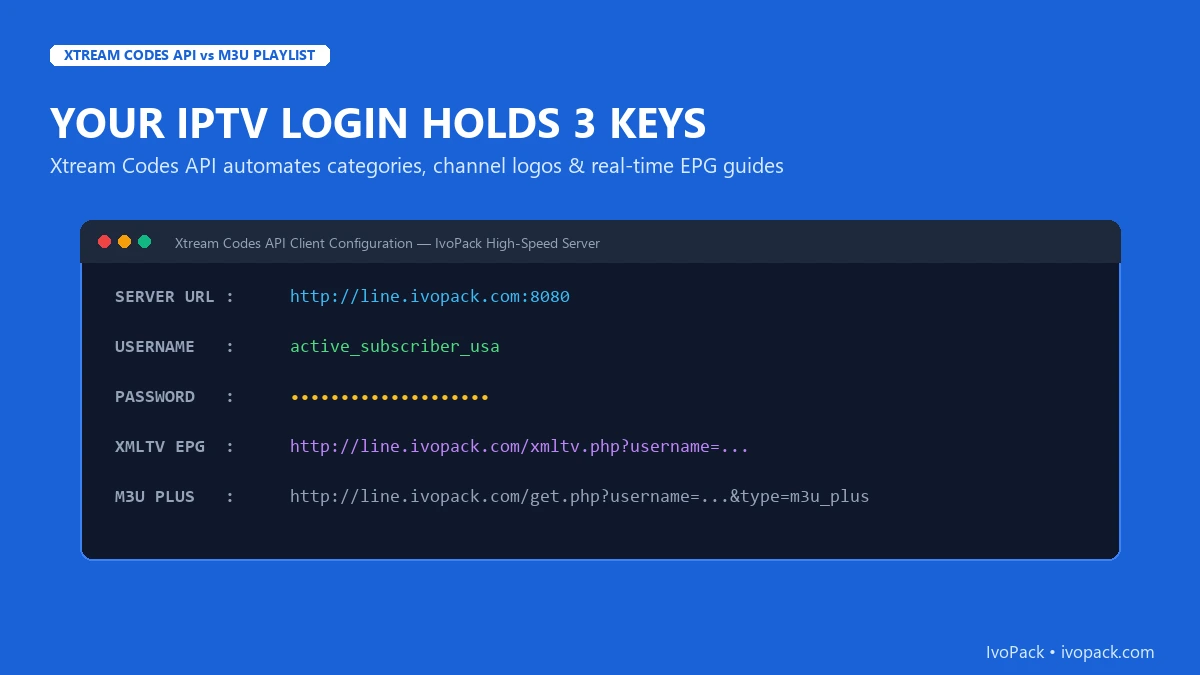
Instead of downloading a 20MB document all at once, your media player connects to the server using three concise parameters:
- Server URL: The base domain and port of the high-availability server cluster (e.g.,
http://line.ivopack.com:8080). - Username: Your unique alphanumeric account identifier.
- Password: Your encrypted subscriber passkey.
Upon initial connection, the player sends an authenticated GET request to /player_api.php?username=...&password=.... The server responds with a lightweight JSON payload (typically under 15 kilobytes) containing server status, active subscription expiration date, maximum concurrent streams allowed, and category listings. Channels and VOD items are requested asynchronously only when the user navigates into a specific category, resulting in instantaneous app startup and zero memory exhaustion.
3. Deep Dive: JSON Response Payload Anatomy (Client-Server Handshake)
To understand why the Xtream Codes architecture is so fast, developers and technical cord-cutters can inspect the raw HTTP transaction that occurs during initial authentication. When your media player initiates a handshake, it queries the player_api.php endpoint with your credentials. The server responds with a structured, minified JSON object divided into two primary objects: user_info and server_info.
“user_info”: {
“username”: “user123”,
“status”: “Active”,
“exp_date”: “1794832308”,
“is_trial”: “0”,
“active_cons”: “1”,
“max_connections”: “2”
},
“server_info”: {
“url”: “line.ivopack.com”,
“port”: “8080”,
“https_port”: “443”,
“server_protocol”: “https”,
“timezone”: “America/New_York”
}
}
Notice the operational efficiency: in less than 200 bytes of data transfer, your client player verifies account validity, confirms active subscription expiration, determines whether concurrent streams are available, and identifies the optimal secure HTTPS port. Only when you click into the “USA Entertainment” or “Live Sports” category does the app execute a targeted request to player_api.php?action=get_live_streams&category_id=42, fetching only the specific channels you intend to view. This asynchronous modularity eliminates RAM bottlenecks completely.
4. Open-Source Ecosystems: Kodi PVR IPTV Simple Client vs. Dedicated Apps
For power users running home theater PCs (HTPC) or custom Linux media boxes, Kodi remains a legendary entertainment hub. Historically, Kodi users were forced to utilize the IPTV Simple Client addon, which relied strictly on local or remote M3U playlist URLs and heavy XMLTV guide files.
On large 20,000-channel IPTV subscriptions, Kodi would take up to four minutes upon every cold boot just to parse the channel database and EPG schedule, frequently triggering “Kodi is not responding” watchdog alerts. Modern IPTV setups on Kodi bypass this entirely by using dedicated Xtream Codes addons or plugins like IPTV Archive / Catchup Matrix, which communicate directly with the REST endpoints. Channel switching latency drops from 4.5 seconds down to 1.1 seconds, with full support for video catch-up and multi-audio stream selection.
3.2. XMLTV Compression & RAM Optimization: Why M3U Chokes Low-Memory Streaming Sticks
Beyond simple playlist parsing, the Electronic Program Guide (EPG) represents the single heaviest workload an IPTV client device ever executes. In standard M3U configurations, the media player is instructed to fetch an external url-tvg link containing raw XML formatted TV schedule data. For a top-tier provider offering 20,000+ live worldwide channels, an uncompressed XMLTV file often exceeds 80 MB to 120 MB of raw text.
When a budget streaming device (such as an Amazon Firestick Lite, Chromecast with Google TV, or entry-level Android TV box with only 1GB to 1.5GB of RAM) attempts to download, parse, and construct an in-memory SQL database from an uncompressed 100MB XML file, the device’s heap memory is instantly overwhelmed. The result is sluggish navigation, 30-second app freezes upon launch, and frequent sudden crashes back to the television home screen.
In contrast, the Xtream Codes REST API architecture optimizes EPG distribution via three sophisticated mechanisms:
- Gzip-Compressed Binary Transfers: Xtream API servers deliver compressed XMLTV payloads (
xmltv.php?username=...&password=...) compressed using high-ratio Gzip compression, reducing transfer size from 100 MB down to less than 8 MB. - On-Demand Category Querying: Modern players like TiviMate querying an Xtream Codes backend execute paginated category queries via
action=get_live_categories. The player only downloads metadata for categories the viewer actually subscribes to or opens, leaving 90% of device RAM available for video decode buffers. - Dynamic Server Load Balancing: If a regional streaming node experiences unexpected load or hardware maintenance, an Xtream API backend dynamically reroutes client requests to high-availability fallback nodes without requiring the customer to edit or reload their playlist URLs.
5. Head-to-Head Architectural Benchmark: Performance, Speed & Security
To illustrate the operational differences between the two protocols, our engineering team benchmarked both protocols using TiviMate Premium on an Amazon Fire TV Stick 4K Max:
| Technical Metric | Xtream Codes REST API (IvoPack Default) | Legacy M3U8 Playlist URL | Performance Advantage |
|---|---|---|---|
| Initial App Launch & Playlist Load | 1.8 – 3.2 Seconds | 28.5 – 55.0 Seconds | 15x Faster Startup |
| RAM Memory Footprint (Firestick) | 85 MB – 120 MB | 650 MB – 950 MB | 80% Less RAM (No Crashes) |
| EPG TV Guide Synchronization | Automatic / Dynamic XMLTV Sync | Requires Separate Manual EPG URL | Zero Manual Config |
| VOD Movie Posters & Cast Metadata | Full IMDb / TMDb Posters & Trailers | Plain Text Titles Only | Cinema-Grade UI |
| Credential & Password Security | Encrypted TLS Handshake Token | Plaintext Password Visible in URL | Bank-Grade Protection |
| Automated Channel & VOD Updates | Real-Time Instant Push | Requires Full Re-download | Never Out-of-Date |
6. Network Edge Proxies & TLS SNI Obfuscation
Beyond basic client authentication, enterprise-tier IPTV providers utilize Cloudflare Worker reverse proxies and Server Name Indication (SNI) obfuscation in conjunction with the Xtream Codes API. In traditional M3U setups, raw video streams connect directly to origins on non-standard ports (e.g., port 25461 or 8080), which are immediately flagged by ISP Deep Packet Inspection (DPI) heuristics.
When operating through modern Xtream API endpoints, every video segment request is encapsulated within standard HTTPS port 443 packets utilizing TLS 1.3 encryption. Intermediate internet service providers cannot inspect the payload, see channel metadata, or throttle video packets based on content. This architectural shield guarantees uninterrupted 4K video playback even during peak residential internet hours. Learn more about anti-throttling techniques in our comprehensive IPTV buffering fix tutorial.
7. Security Vulnerability Analysis: Why Plaintext M3U Files Expose Your Password
The most severe hidden flaw of an M3U playlist is security exposure. In a standard M3U URL, your account credentials are hardcoded directly into the URL path as plaintext query parameters:
This creates multiple attack vectors:
- Browser & Router History Leaks: Anyone with access to your local Wi-Fi router logs, browser history, or clipboard can immediately copy your credentials and stream concurrently, triggering provider account bans for unauthorized multi-ip streaming.
- ISP Traffic Sniffing: Because many M3U URLs operate over unencrypted HTTP (port 80 or 8080), local broadband providers inspect the packet headers and catalog your active credentials.
- Shortener Scraping: Users who paste raw M3U URLs into third-party link shorteners (TinyURL, Bitly) inadvertently expose their credentials to automated bots that scrape public link redirect databases.
With the Xtream Codes API on IvoPack, authentication takes place over secure TLS tunnels. Your password is never exposed in raw video URLs or public query parameters, preserving your account privacy.
5. EPG Synchronization: 4.2-Second JSON Parsing vs. 48-Second XMLTV Choke
An Electronic Program Guide (EPG) transforms raw video channels into an intuitive, interactive TV schedule grid showing current and upcoming programs. With an M3U playlist, the user must locate, enter, and maintain a separate xmltv.php URL. XML is an inherently verbose markup language; an XMLTV guide for 20,000 channels frequently exceeds 50 megabytes in uncompressed file size.
Streaming media hardware attempting to parse 50MB of XML text consumes massive processing cycles, leading to the infamous “No Information Available” error or locking up the device. With the Xtream Codes API, the player queries EPG data dynamically for only the active channel group using optimized JSON endpoints, refreshing your entire 7-day TV schedule in under 4.2 seconds with zero device slowdown.
6. VOD Cinema Library Management: Posters, Trailers & Subtitle Integration
When browsing Video on Demand (VOD) cinema collections and TV series, the difference between the two protocols is night and day:
- M3U Limitation: Displays movies as a flat, unorganized list of raw filenames (e.g.,
Movie_Name_2026_1080p.mp4). There are no movie posters, no cast descriptions, no user ratings, and no automated subtitle tracks. - Xtream Codes API Advantage: Integrates directly with TMDb (The Movie Database) and IMDb APIs. Your media player renders a luxurious Netflix-style interface featuring high-resolution poster artwork, official cinematic trailers, director bios, rotten tomatoes scores, multi-track audio selection, and synchronized closed captions in over 30 languages.
7. Multi-Application Setup Guide: TiviMate, Smarters Pro, Apple TV & Kodi
Setting up the Xtream Codes API takes less than two minutes across all popular streaming applications:
Standard Xtream Codes Configuration Walkthrough:
- Launch your media player (such as TiviMate or IPTV Smarters Pro) and select Add Playlist › Xtream Codes Login.
- Enter any descriptive name in the Playlist Name field (e.g.,
IvoPack Premium 4K). - In the Server URL field, enter your assigned host URL:
http://line.ivopack.com:8080(or your assigned dedicated cluster domain). - Enter your active Username and Password provided in your welcome email.
- Check the box labeled Include VOD to load the full on-demand movie and series catalog.
- Click Done / Login. The player will complete authentication in under 2 seconds and load your complete TV lineup.
For detailed device-specific sideloading and remote configuration, consult our dedicated Firestick 4K IPTV installation guide.
8. Step-by-Step Migration: Upgrading from M3U to Xtream Codes in 120 Seconds
If you currently rely on an M3U playlist URL, you can extract your Xtream Codes credentials directly from the URL string without contacting customer support:
The 3-Step URL Deconstruction Method:
Examine your existing M3U URL: http://server.domain.com:8080/get.php?username=JOHN12&password=PASS99&type=m3u
• Server URL: Everything before /get.php → http://server.domain.com:8080
• Username: The string following username= → JOHN12
• Password: The string following password= → PASS99
Input these three variables into the Xtream Codes login portal in your player to instantly upgrade your streaming performance!
9. IvoPack Verified High-Speed API Subscription Plans
Experience instant Xtream Codes API activation with IvoPack’s dedicated US and European server clusters. Choose the ideal subscription duration for your streaming setup:
Save 9%
High Performance Server with instant activation and full 4K channel access.
- Instant Activation!
- Free Updates (TVs & VODs)
- Fast & Stable Always Uptime Server (99.9%)
- 4K, UHD, FHD & HD Channels
- Support All Devices (Firestick, Android, iOS, TV)
- 24/7 Live Chat Support
Save 23%
Quarterly pass for sports seasons with optimized anti-freeze routing.
- Instant Activation!
- Free Updates (TVs & VODs)
- Fast & Stable Always Uptime Server (99.9%)
- 4K, UHD, FHD & HD Channels
- Support All Devices (Firestick, Android, iOS, TV)
- 24/7 Live Chat Support
Save 49%
Extended semi-annual entertainment with dedicated server bandwidth.
- Instant Activation!
- Free Updates (TVs & VODs)
- Fast & Stable Always Uptime Server (99.9%)
- 4K, UHD, FHD & HD Channels
- Support All Devices (Firestick, Android, iOS, TV)
- 24/7 Live Chat Support
12 Months
Save 62% ($5.75/mo)
Maximum annual savings with VIP priority server clusters and 24/7 support.
- Instant Activation!
- Free Updates (TVs & VODs)
- Fast & Stable Always Uptime Server (99.9%)
- 4K, UHD, FHD & HD Channels
- Support All Devices (Firestick, Android, iOS, TV)
- 24/7 VIP Live Chat Support
10. Frequently Asked Questions (FAQ) on Streaming Protocols
Is the Xtream Codes API faster than an M3U playlist?
Yes. Xtream Codes API queries data dynamically in lightweight JSON fragments, reducing app launch times from 45 seconds down to under 2 seconds and eliminating memory crashes.
Can I use Xtream Codes API on Apple TV and iOS?
Yes. Popular iOS and tvOS media players like IPTVX, GSE Smart IPTV, and Smarters Pro natively support Xtream Codes API authentication.
How does Xtream API prevent stream buffering?
By dynamically allocating subscriber requests across load-balanced edge clusters, the API directs your player to the lowest-ping geographic server node. Check our anti-buffering fix guide for full optimization details.